Four PAA depth levels, D0 to D3
Lid off grabs the questions Google already shows. Then go one layer, two layers, or all the way down. You see the time before you start.
D0~5 sec
D1~10 sec
D2~30 sec
D3~1-2 min
Every Google search hides a stack of People Also Ask questions. Open one and it spawns more. PAA Box unpacks the whole stack, up to four levels deep, and hands it to you as a CSV. It’s a free Chrome extension, so this People Also Ask tool works on the Google search you already have open.
Free in the Chrome Web Store. PAA Box Pro adds Google's answers and a content plan.
01 · Google shows you four. Then it keeps going.
This is the People Also Ask box. Open a question and Google quietly adds more to the bottom of the list. Try it. There is no end in sight, and no way to see the whole thing at once.
Click any question.
Illustration of a Google results page, with sample answers. Not affiliated with Google.
02 · PAA Box opens every one of them.
Most web-based People Also Ask tools run the search on their own servers. PAA Box runs in your Chrome: pick how deep to go and it clicks through the whole stack for you, right on the results page. Questions only takes seconds. With answers, part of PAA Box Pro, also saves Google’s answer and source for each one.
Mode
Depth
0questions found
The real thing
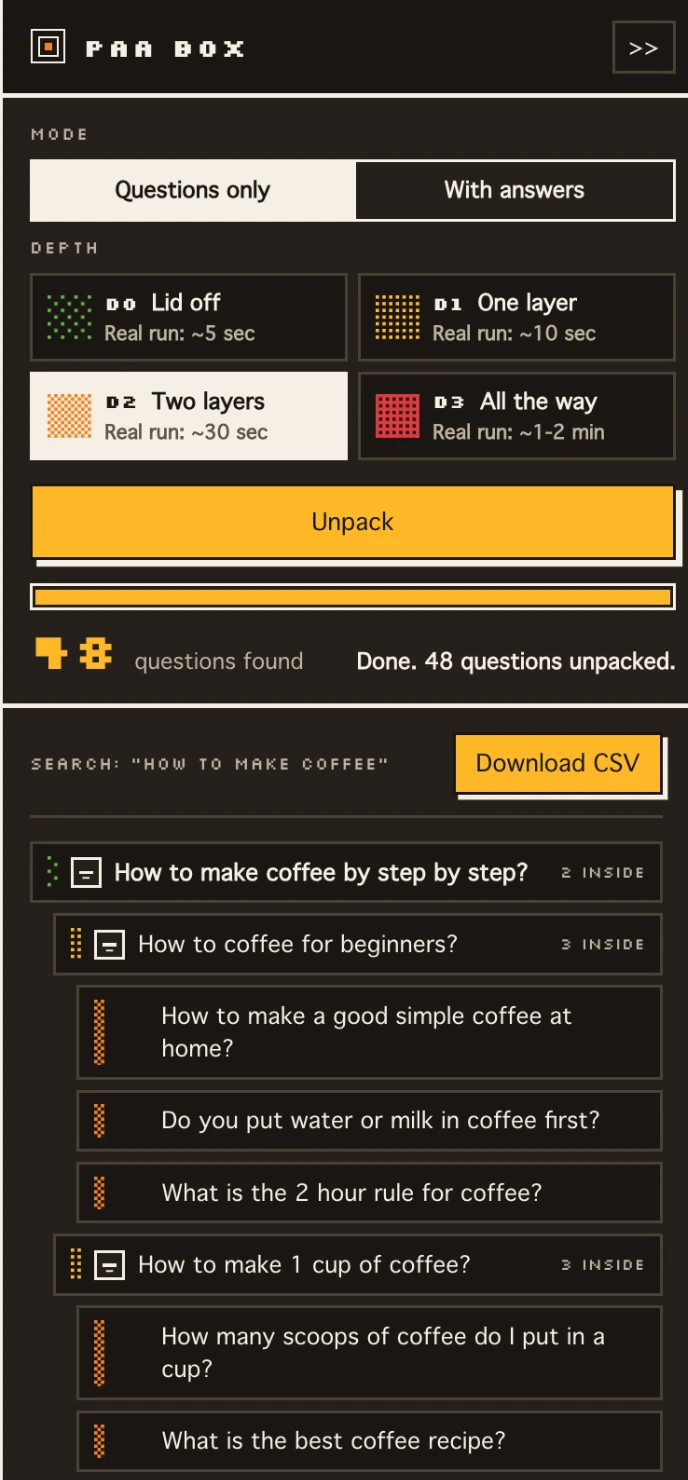
The demo above is a toy. This is PAA Box on an actual Google search for “how to make coffee”: every question in the box, nested under the one that opened it, with the CSV one click away.
03 · Everything in the box.
A People Also Ask tool with no copy and paste and no second tab. Everything happens on the results page in front of you.
Lid off grabs the questions Google already shows. Then go one layer, two layers, or all the way down. You see the time before you start.
Every question you open spawns more. PAA Box keeps clicking through, so you get the ones Google never shows at once.
Questions only is quick, and free. With answers, a Pro feature, also saves Google’s answer and sources for every question.
Download the whole stack with its depth structure intact, ready for a content plan or a spreadsheet.
Each depth tells you how long it will take before you press go. A deep run is never a surprise.
Research results in other markets. Country domains are opt in, so it only reaches the ones you approve.
The panel opens inside the search you are looking at. Nothing to paste, nothing to switch to.
04 · 617 people already use it.
★★★★★
…Have been using various tools (including Ahrefs, SEMRUSH etc.) to get PAA for specific topics but this extension is a life saver! Concept of showing tree of PAA questions in a correct order is a true gem!
★★★★★
If you use PAA content, this tool is a must to cut time and get what you need quickly.
★★★★★
…It takes the guesswork out of content planning and ensures you're targeting the right questions your audience is actually asking.
★★★★★
Great extension for getting topic ideas that will match user intent! Doesn't get any better 🙂
★★★★★
It's a neat extension that gives you some PAA ideas that you can use for content creation. Doesn't seem to be heavy or slow down my browser.
★★★★★
Fantastic tool to extract PAA…
Reviews of the extension on the Chrome Web Store, written when it was called BlogStorm: People Also Ask Tool. Quoted as written; “…” marks a shortened review. Figures as of 4 November 2026. Read every review. Made by BlogStorm, led by Rabih Rizk. About PAA Box.
05 · Learn what’s in the box.
Everything we learned unpacking Google’s People Also Ask box, in 67 guides. 37 are laid out the way the box works: one complete guide, six topics, and a page for every question inside them. The other 30 go wider, in our guides to Google SERP features, question keywords, SEO content strategy and AnswerThePublic alternatives.
Start here · the complete guide What is People Also Ask in Google? People Also Ask is a Google search feature that shows questions related to your search. Each question opens to a short answer with a credited source, and opening one usually… Open the guide →06 · Before you open the box.
The short answers. The how it works guide and the People Also Ask guides go deeper.
Yes. The free extension unpacks People Also Ask up to four levels deep, questions only, and exports CSV. PAA Box Pro is $7 for 7 days, then $90 a year. It adds Google’s answers and sources, a question map, an AKA content plan, history and AI-assistant access. See how Pro works.
It reads the People Also Ask block on Google result pages you open. The free extension makes no network requests of its own and sends nothing anywhere, so your questions stay in your browser unless you export them. With Pro, answers and history stay in your browser too. Pro checks your license with paabox.com about once a day, sending only a device token. The privacy policy has the details.
Four levels. D0 (Lid off) grabs the questions Google already shows, then D1, D2 and D3 keep opening them. Questions only takes about 5 seconds at D0 and 1 to 2 minutes at D3. With answers (a Pro feature), allow up to about 12 minutes at D3.
Yes. It works on google.com out of the box, and you can allow other Google country domains when you need them. Chrome asks your permission first, so the extension only ever reaches the ones you approve.
Opening a lot of questions quickly can look automated to Google. If a captcha appears, solve it and go a little easier: a lower depth or a short break between big runs.
No. PAA Box is an independent tool made by BlogStorm and is not affiliated with or endorsed by Google.
07 · Go Pro: open every answer, too.
PAA Box Pro
$7 for 7 days, then $90 a year. Google's answer and source for every question, a question map, an AKA content plan, history and AI-assistant access. Cancel during the 7 days and the $90 is never charged.
The free version unpacks People Also Ask up to four levels deep and exports the whole stack to CSV. No account needed.
Add to Chrome